Frame Your Thinking
Articles like these often start by defining the term project in technical terms as something like ‘a sustained effort between multiple people or teams to achieve a defined outcome.’
In a dental context—and in more practical terms—this could relate to anything from a practice refurbishment to a new website build or an open day to promote clear aligner treatment.
A project on the horizon can kick off a rabbit-in-headlights response, leaving project owners wondering how to get started. And it doesn’t help that there are thousands of competing project management frameworks, methodologies and software systems, all making bold claims about being the best and most effective tool for the job.
However, most proponents of the various frameworks often fail to consider that each project is unique: The tools required to plan and carry out a group-wide rebrand couldn’t be more different than those needed to take a dental lead management platform to market (trust us, we know!) or develop a subscription-based dental mentoring and education platform from the ground up (ditto).
For that reason, you won’t find an all-out endorsement of any single project management framework or system here. Instead, we’ll provide a brief overview and comparison of several of the most popular methodologies and explore some of the factors you should consider before embarking on your bold, audacious plan—whatever it may be.
Goal Setting For Dental Projects
A project is essentially the realisation of a goal. By definition, then, there’s no going anywhere until the goal is clearly defined.
Statements like, “I want a new website.” Or, “I want to re-brand my clinic” will only take you so far.
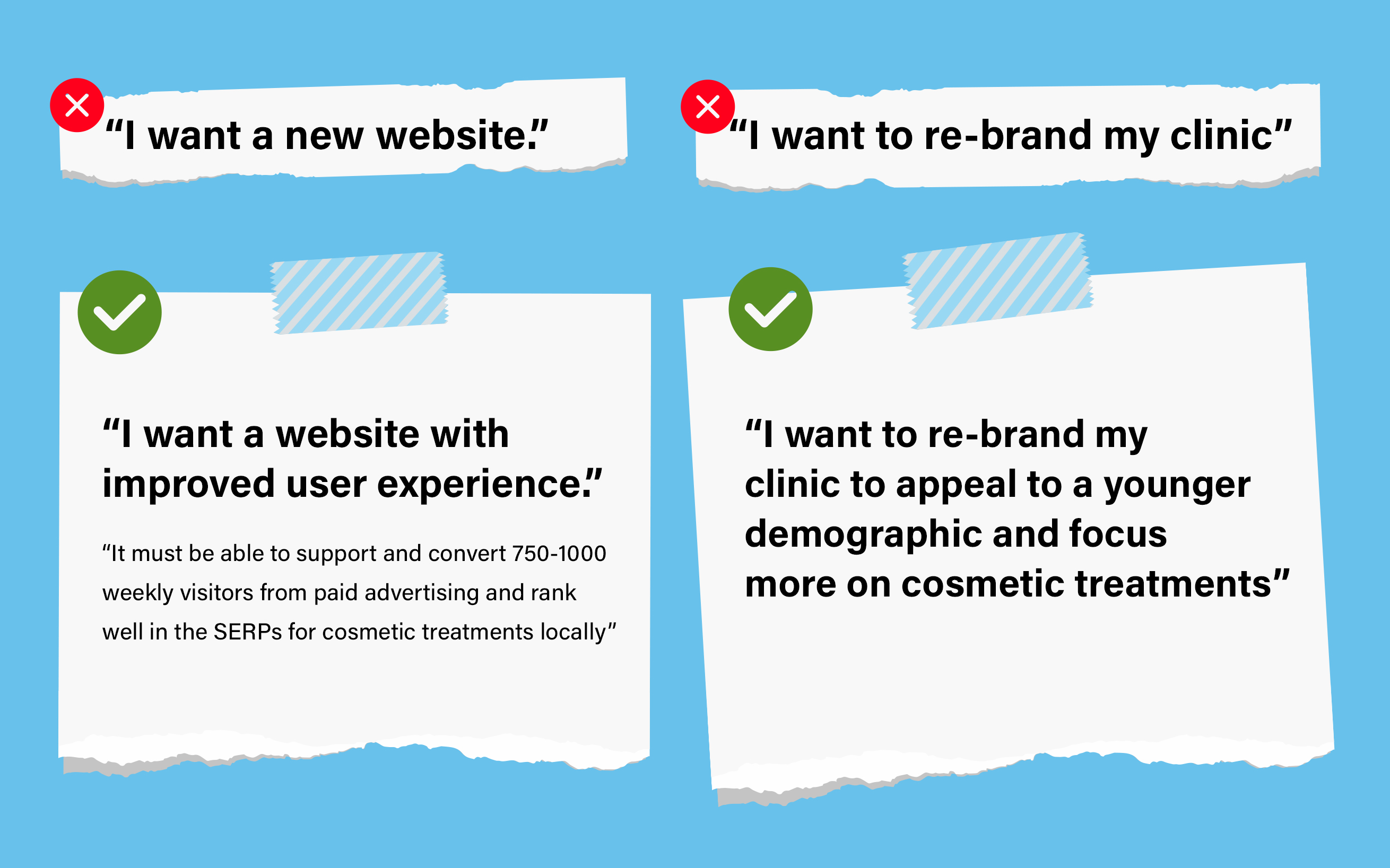
Compare these to more specific and measurable statements like: “I want a website with improved user experience. It must be able to support and convert 750-1000 weekly visitors from paid advertising and rank well in the SERPs for cosmetic treatments locally.”
Or: “I want to re-brand my clinic to appeal to a younger demographic and focus more on cosmetic treatments,” and you’ll begin to spot some of the potential areas of focus for the work ahead and start building a detailed list of deliverables.
Specific and measurable are the first components of the SMART goals acronym trotted out so often in project management circles that it’s almost cliche. SMART goal setting dictates that project objectives should also be achievable, relevant and timely.
Some negative thinking can also be useful when goal-setting: Mapping the consequences that could play out if the goal isn’t achieved within the given timescale can provide valuable perspective while keeping teams focussed and motivated along the way.
Dental Project Management Elements
Of course, good project management means resisting the temptation of a mad dash to your end goal and instead considering how to prioritise, manage and fulfil the many sub-tasks and sidequests that make up your project.
Elements to consider before the starter pistol goes bang include:
Designing Deliverables
Don’t confuse project deliverables with the project goal itself. A deliverable is any output you’ll need to create along the way to help you achieve your goal. Deliverables can be internal or external and should be set out and agreed upon before getting started.
Going back to the web design example from earlier, internal deliverables for which you and your team are responsible could include:
- Budget, time-tracking and management reports
- Progress reports
- Hosting setup
- Stakeholder signoff
Meanwhile, external deliverables—anything outsourced to a third-party team—might include:
- Web design wireframe
- Mobile site
- Chatbot integration
- Systems testing
- The completed website
Resource Allocation
Assigning tasks to the right people is essential. You’ll need to find a balance between over and under-utilising team members to keep productivity and morale ticking.
Resources can also include equipment, materials and space—all of which must be allocated in good time to ensure team members have access when needed.
Scheduling and Reporting
Resources can be time-constrained (subject to deadlines) or resource-constrained (limited by the quantity available).
Resources cost money, so assessing, understanding and balancing the available resources of both varieties is crucial for keeping projects in the green.
Dental Project Management Budget Tracking
Nothing stops a project in its tracks like running out of cash. Budget is one of the resource constraints project managers will want to keep an extra-close eye on. This means knowing how completing individual tasks, and phases will affect the bottom line and managing non-billable costs that can quickly eat into profitability.
Risk Management in Project Management
Even the most seemingly straightforward project is fraught with myriad risks that could spell game over for your endeavour. The key is taking a proactive approach to anticipating potential problems and designing solutions before they arise.
One common approach for large-scale projects is a risk ID session where stakeholders and project participants come together to create an exhaustive list of everything from potential hurdles to outright doomsday scenarios. From there, project managers can prioritise dealing with individual risks according to the likelihood and potential impact.
Adaptation
You set out clear goals in your project charter. But what if they change once you get going? It’s not uncommon for clients to push for new features (scope creep) or simply move the agreed goal posts mid-flow (scope change).
Effective project management means having a defined process to request, assess and approve changes—and not being afraid to say ‘no’ if the business case is missing.
Communication
Once all of the above is in place, the project manager needs to share objectives and keep team members in the loop so that vital deadlines aren’t missed and tasks replicated. They’ll need to do all this and more while keeping stakeholders informed about the project’s status.
The Dental Project Charter
It helps to record details like objectives, deliverables, budget and other information in a Project Charter—a short and sweet document detailing the project in full.
Project charters don’t have to be pages long and should be created with as much team feedback and collaboration as you can muster.
It’s a handy doc to have around when scope creep, scope change or input from overzealous clients threaten to throw the mission off course.
A project charter typically includes:
- Your reasoning for carrying out the project
- Project objectives
- Deliverables
- Constraints and limits
- A list of stakeholders
- An overview of potential risks
- Benefits
- Budgetary information
Dental Project Charter Example
Smiles Inc. Dental Clinic Project Charter
Project: Clear Aligner Open Day – Summer 2023
Description: A weekend open day to promote clear aligner treatment at Smiles Inc. Dental Clinic.
Business Case:
- Support the practice’s goal of increasing clear aligner provision over 2023-24 and establish the clinic as a Gold provider
- Increased social media presence and local leadership status
Project Deliverables:
- Social advertising and landing page for open-day invites
- Local press and social media advertising
- An open day at the High Street clinic
- 20-30 clear aligner sign-ups
Project Benefits:
- Reputation
- Lead generation
- Financial benefits of Gold accreditation
Risks:
- The team lacks marketing experience to promote the event
- Organisational challenges on the day
Milestones:
| Inform and rota available staff | May 1st |
| Launch press advertising | May 8th |
| Launch landing page and social advertising | May 8th |
| Arrange catering and entertainment | May 15th |
Roles and Responsibilities
| Phil McCavity | Project Manager |
| Cody de Burgh | Landing page creation |
| Sally Lancit | Social & press ads |
| Pete Yankum | Meet and greet, catering and entertainment |
Project Budget:
- Should not exceed £2000
Agile
If you want to tell the world you’re serious about something, write a 12-point manifesto.
That’s what early proponents of Agile did when devising a framework that could live up to the requirements of complex code-based projects that emerged in the early noughties.
Agile is a highly adaptive framework in which milestones are meticulously mapped, and teams are given maximum flexibility to achieve them. Consequently, Agile developers might have a clear idea of which features need to be rolled out in the next iteration and by when but little idea about which exact tasks they’ll have to work on over the next weeks or months to make it happen.
Agile requires constant, open collaboration and communication as teams self-organise to plan, implement and evaluate milestone after milestone.
Agile Benefits – Client Engagement
Agile’s flexible approach allows for greater client engagement. Clients are involved in the decision-making process and can change the roadmap, add new features or change the project direction as needed without creating too much stress for the agile team.
Flexible=Fast
By working iteratively, agile teams can bring a minimally-viable product (MVP) or features to market faster than non-agile competitors.
Quality and Testing
Constant feedback integration, testing and quality control mean Agile makes for reliable, robust products.
Continuous Improvement
Continuous improvement is one of the 12 principles in the Agile manifesto. So, in theory, developers shouldn’t repeat mistakes from one iteration to the next. The Agile commitment to improving also makes highly skilled multidisciplinary teams.
Scrum
Although the next Scrum pre-dates Agile by a decade or so, it’s also an integral component and a powerful project management tool in its own right.
The idea couldn’t be simpler: A small team meets daily to discuss priority tasks and report potential obstacles to a Scrum master, whose job is to clear the day’s roadblocks.
The work takes the form of short sprints toward iterative improvements from a prioritised to-do list called a backlog. Like Agile, there’s a strong focus on defining goals and deadlines instead of micromanaging individual tasks.
For Scrum to work, teams need to be largely self-organising and ready to learn as they go along.
If a daily meeting sounds like your idea of a nightmare, don’t discount Scrum yet: Daily Scrums are short, snappy and usually protected from overrunning by tight time windows for each speaker to get their point across.
Scrum Benefits – Goal Definition
Each work sprint or cycle has a clearly defined goal, so it’s easy to measure and report overall progress.
Flexibility
Scrum is an Agile workflow that allows teams to adapt quickly to changing project requirements.
Tried and Tested
Scrum features regular, rigorous testing by the whole team, the Scrum master and the client, making for a robust finished product.
Feedback and Growth
Developers give feedback daily on obstacles and roadblocks, and retrospective meetings following each sprint allow the team to share their lessons to encourage personal growth and improve processes going forward.
Case Study—Agile, Scrum and IAS Academy
When we first started developing IAS Academy’s membership and mentoring platform, our initial approach was working with academy stakeholders to deliver their plans for the platform wholesale—working to a huge project spec with a single completion date far off in the future.
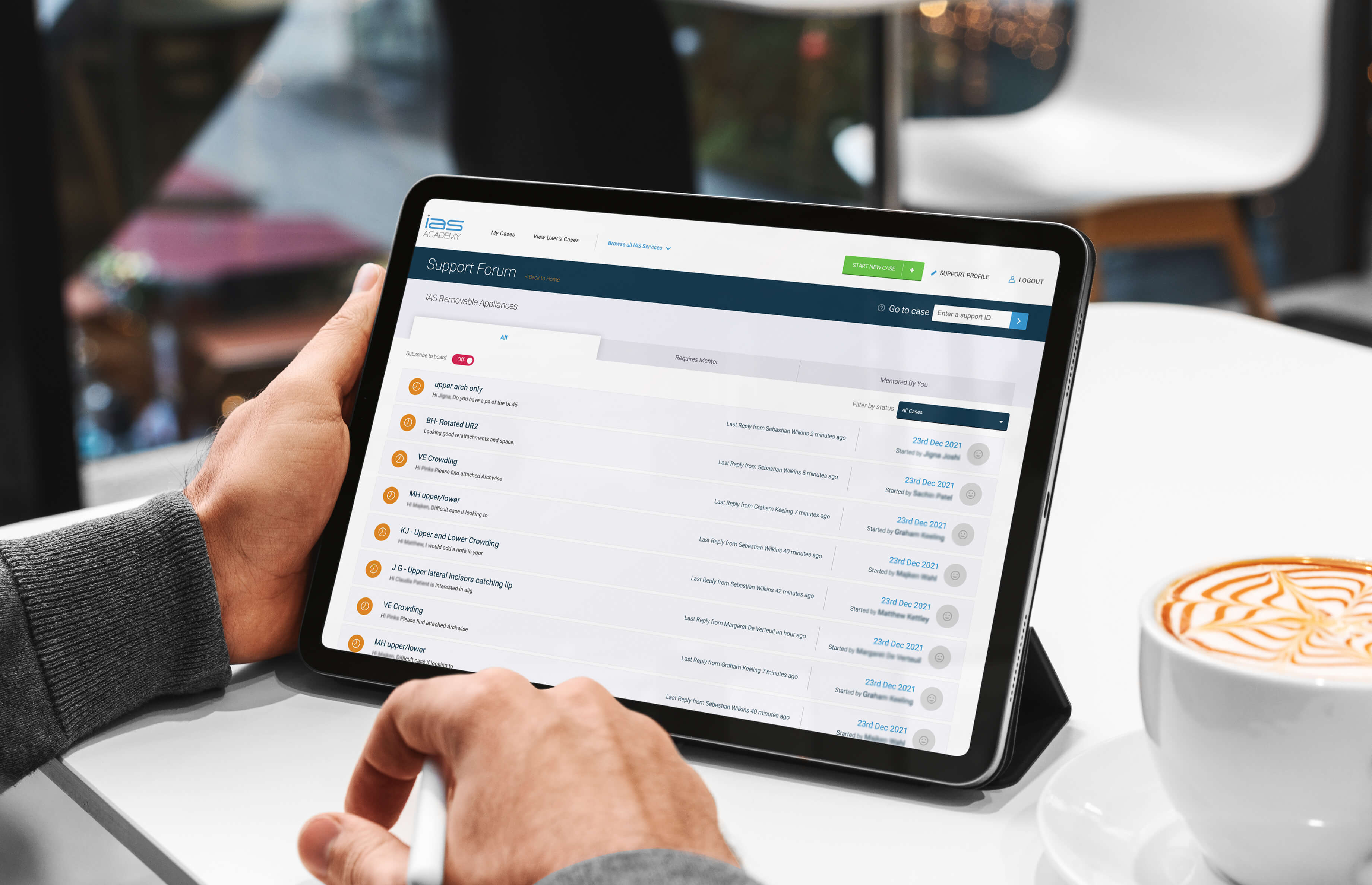
But we quickly found the academy’s requirements to be highly fluid. Consequently, we’d spend ages building features that ended up seeing little use. And headline features could change so significantly from week to week that just keeping track of deliverables became a full-time project.
Things changed when we adopted an Agile approach, focussing solely on the academy’s priority support forum instead of trying to deliver it in tandem with membership features.
To achieve this, we delivered the forum feature-by-feature working to flexible ETAs designed to account for the unpredictable workflows of working with complex and often unfamiliar code.
We worked in two-week iterations supported by daily scrums, capped with rigorous testing and a retrospective to discuss how the team could improve over the next iteration. And—crucially—we also gave fortnightly demos to IAS showing off what we were working on.
We completed the forum just a couple of months after going Agile and took what we’d learned to add a paid subscription feature, members’ content area and online course booking in a similar timeframe.
The final feature—an innovative e-learning platform—was delivered in record time just as the COVID pandemic kicked in, allowing the academy to stay competitive and profitable throughout lockdown.
The project is still maintained this way today—it’s less about completing a single mammoth project and more about delivering specific features, one at a time.
James Dunne, Lead Developer at The Fresh dental marketing and growth agency
Lean Project Management – Muda, Muri and Mura
Closely related to just-in-time manufacturing, Lean project management principles were first developed by Toyota in Japan in the 1950s. The framework gained international popularity during the oil crisis of the 1970s when embargoes on US oil sent global prices through the roof.
It’s easy to see why the framework gained traction when manufacturers were worried about rising costs: Lean aims to maximise efficiency and reduce cost by reducing ‘the 3M—muda, muri and mura.
Muda is any activity that uses up resources without creating value and can be neatly categorised into seven types of wastefulness: transport (over-movement of products), inventory, motion (over-movement of people or equipment), waiting, over-production, over-processing, and defects.
Muri, meanwhile, refers to overburdening the team or overstretching resources with unrealistic deadlines and targets. (Imagine the drop in quality and the resulting fallout from dissatisfied patients if you tasked associates with six veneer cases every day…)
And the term mura defies easy translation but essentially means unevenness or irregularity that causes excessive muda.
An easy way to picture the muda-producing effects of mura is to imagine an unusually quiet day in the clinic with few patients, several cancellations and the whole team sitting twiddling their thumbs. Here, uneven demand has caused excessive waiting—one of the seven sins of muda.
Lean was more-or-less formally ported to software development with the publication of Mary and Tom Poppendieck’s 2003 book Lean Software Development, which puts forward seven principles closely related to lean manufacturing:
- Eliminate waste
- Amplify learning
- Decide as late as possible
- Deliver as fast as possible
- Empower the team
- Build integrity in
- Optimize the whole
Lean Benefits – Efficiency, Productivity & Profitability
Lean is all about reducing the 3M and establishing more efficient ways of working. While it can take time to develop smooth-running Lean workflows, doing so can result in a major productivity boost at a reduced cost.
Which Project Management System is Right For You?
Agile’s advocates argue the framework is more of a mindset than a methodology, and fans of lean have pointed out how the system’s simplicity and focus on organisation and self-discipline have parallels in Zen Buddhism.
But that needn’t mean signing up to a grandiose manifesto or cultivating mindfulness to get things done: Integrating and repurposing aspects of varying systems to meet your needs can yield astonishing results.
At The Fresh, for example, a team of developers have used an Agile-based framework to deliver project after project. They’ve pushed themselves to solve project-specific challenges by learning new skills that make further challenges down the line a non-issue.
And because they’re largely self-organised, developers have achieved all of this while freeing project managers from dealing with code or tech-based based problems I don’t truly understand.

In fact, the Agile workflow has yielded such impressive results that the team has rolled out a daily Scrum—a daily ritual that can also be a game-changer in the clinic. (Listen to Prav’s short solo podcast here to discover how).